Learn Industrial Engineering the practical way
Free articles, Excel templates and calculators on IE, Excel and the garments industry - written from real factory experience.
INT Function in Excel
INT rounds a number down to the nearest integer.
ABS Function in Excel
ABS returns the positive value of any number, removing the negative sign.
CHOOSE Function in Excel
CHOOSE returns a value from a list based on an index number you provide.
OFFSET Function in Excel
OFFSET returns a reference shifted by rows and columns from a starting cell.
INDIRECT Function in Excel
INDIRECT converts a text string into a valid cell reference.
HLOOKUP Function in Excel
HLOOKUP searches the first row of a table and returns a value from a specified row.
XLOOKUP Function in Excel
XLOOKUP is the modern replacement for VLOOKUP with more flexibility.
 Quality
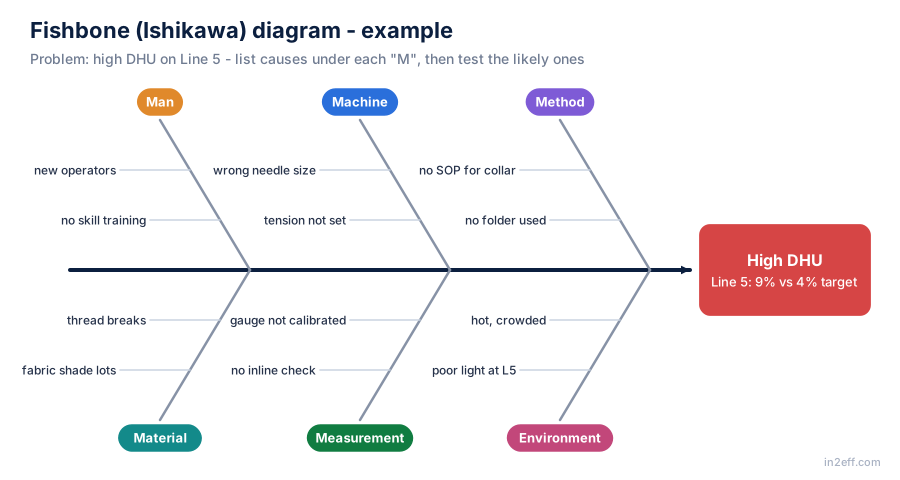
Root cause analysis in garments: 5 Why, fishbone and CAPA
How to move from "rework it" to "stop it happening": a fishbone example for high DHU, a 5 Why chain, and a corrective and preventive action (CAPA) format that closes the loop.
 Quality
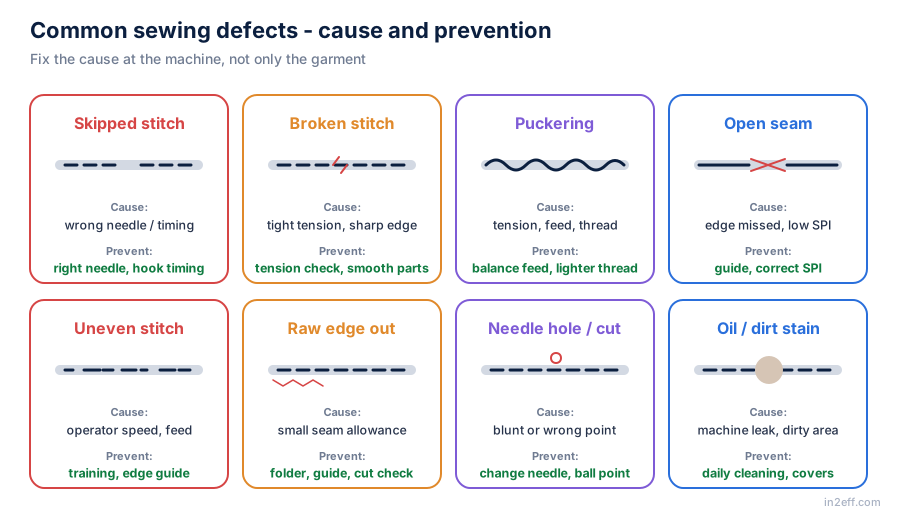
Common sewing defects: causes and prevention
Skipped stitch, broken stitch, puckering, open seam, uneven stitch, raw edge, needle holes and stains - what causes each and how to stop it at the machine.
Calculators for everyday IE work
Target, efficiency, line balancing, man machine ratio, machine requirement and time study.
Templates & guides
Excel, PDF and Word files, ready to use. Files marked 🔒 are for members.
Get one practical IE tip every week
Join IE and production professionals learning with in2eff.